
Customers are expecting a 1-2 day turnaround time for your final approval of their account. Approving customers in a timely manner is an important part of meeting customer requirements.
Click here to go directly to the Approve Pending Mailboxes page or follow the below steps.
You will receive an automatic notification from us once a customer has submitted the required documents or successfully completed their application for approval and the customers document been pre approved by our 1583 team.
If you have received a notification the customers account is ready to be reviewed and approved by you.
If you did not receive a notification or if you do not see the customer pending on your dashboard, this means that that the customer is not ready to be approved.
"Online Notary Pending": The customer has already completed the online notary session and is ready for you to approve.
How to approve customer's documents:
1. Scroll down to the Document Approval tile and click on the "Pending" box.
2. Identify Pending Recipient:
- The Approve Pending Mailboxes screen will list all of the customers awaiting approval.
- Click "Show All" to view all accounts, instead of only showing those from the past 45 days.
- Click "View Docs" to view the documents provided.
3. Perform an Action:

- Click the check mark to accept the customers document.
- Click the return arrow to the documents back to our 1583 team.
- Click the X to reject the customer.
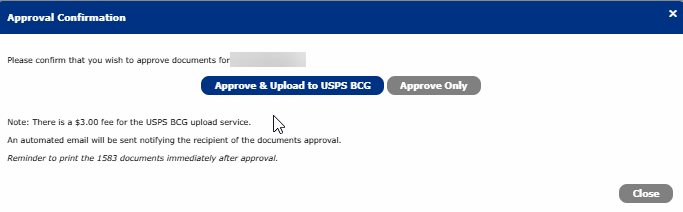
4. Confirm your selection:
- Approve and Upload to the USPS BCG- iPostal1 will upload the customers documents at a small fee of $3.00
- Approve Only- You are require to upload the documents to the BCG
Additional Features:
- Send Email- communicate further with the customer about their forms/IDs.
- Email History- view all communications by iPostal1 and the customer.
- Docs History- view all activity and notes submitted.
Note:
- If you accidently approve a customer please contact support to un approve.
- For security reasons, the customers email address will not be visible but you can send them an email from our system if necessary.