
You can now add iPostal1 Digital Mail Services to your Physical Mailbox customers. The customers mail items will be processed the same as a regular iPostal1 virtual mailbox customer and is held at your location.
The difference is they can manage their account virtually or request a task to " Put in Box". This request will place their mail in their physical box. All of the customer's requests will appear on your To-Do list. Once it has been inserted in their mailbox, it's marked as "Delivered", with no further actions available.
How to Add Digital Mail Services to your Physical Mailbox Customers:
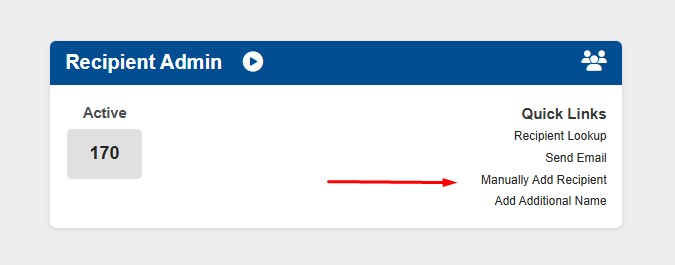
1. Go to "Recipient Admin" tile. Click "Manually Add Recipient".
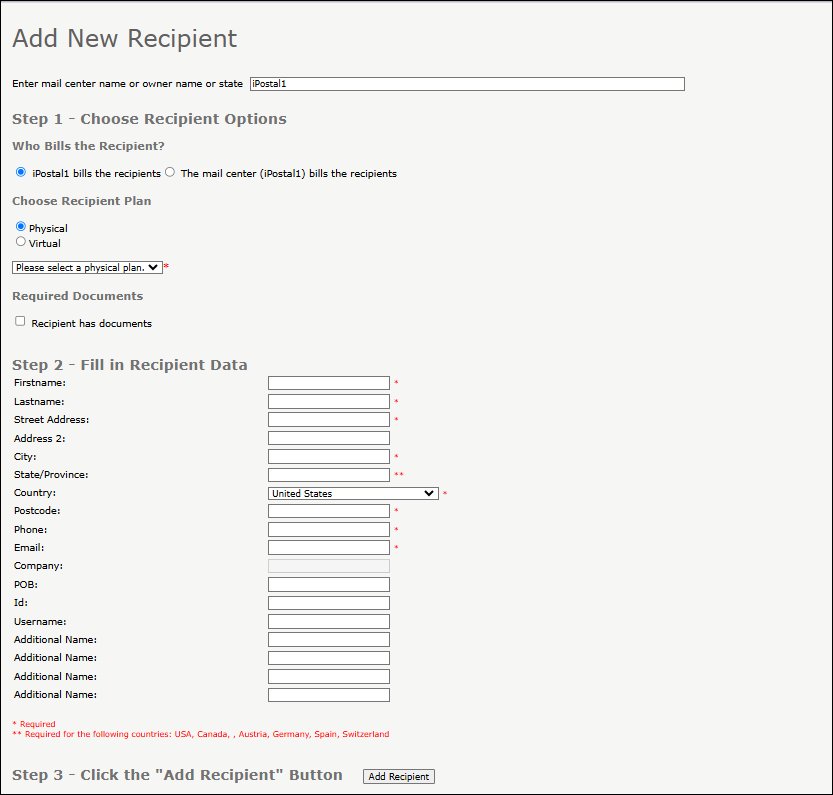
2. Choose Recipient Plan: Click "Physical" and choose your pricing from the dropdown menu.
3. Select from the pricing plan options below:
Plan | Items per month | Monthly Mailbox Fee | Store Revenue | Store Share of Revenue |
$6 Plan | No limit | $6.00 | $3.00 | 50% |
$8 Plan | No limit | $8.00 | $4.00 | 50% |
$10 Plan | No limit | $10.00 | $5.00 | 50% |
$12 Plan | No limit | $12.00 | $6.00 | 50% |
$15 Plan | No limit | $15.00 | $9.00 | 60% |
4. Required Documents: Check the Box if you already have an updated form 1583 for the customer. If you do not have a form 1583 for the customer on file, the customer should fill one out in your presence and provide 2 acceptable IDs first and then, you can proceed to check on the box.
5. Enter all of the Customer’s Personal information, (the POB can stay blank).
6. Click on "Add Recipient". The customer has now been successfully added and assigned an iPostal1 mailbox number.
- The Customer will receive an email welcoming them to iPostal1, providing them with links to download the iPostal1 App to their Mobile Devices.
- The customer will need to login and provide their credit card information. Once the payment is processed successfully, the account will be activated.
Note:
- iPostal1 collects payment for the digital mailbox fee and optional services just as a regular customer.
- You continue to collect payment for your customer's physical mailbox.
- The revenue share will be based on the customers plan selected.